
Turns flat 2D game covers into realistic 3D box renders.
How to install
- Linux: Make the file runnable: right-click it, open Properties, and allow it to run as a program, or run
chmod +x Slipcase-x86_64.AppImage. Then double-click it. - Windows: Run the file. If Windows shows “Windows protected your PC”, choose More info, then Run anyway.
- macOS: Open the file and drag the app into Applications. If macOS says it cannot verify the app, open System Settings → Privacy & Security and choose Open Anyway.
Support Slipcase
Slipcase is free and open source. Donations pay for the time it takes to fix bugs, add features and keep it working as computers change. If it's useful to you, any amount helps.
Demo
Read what the video showsHide the description
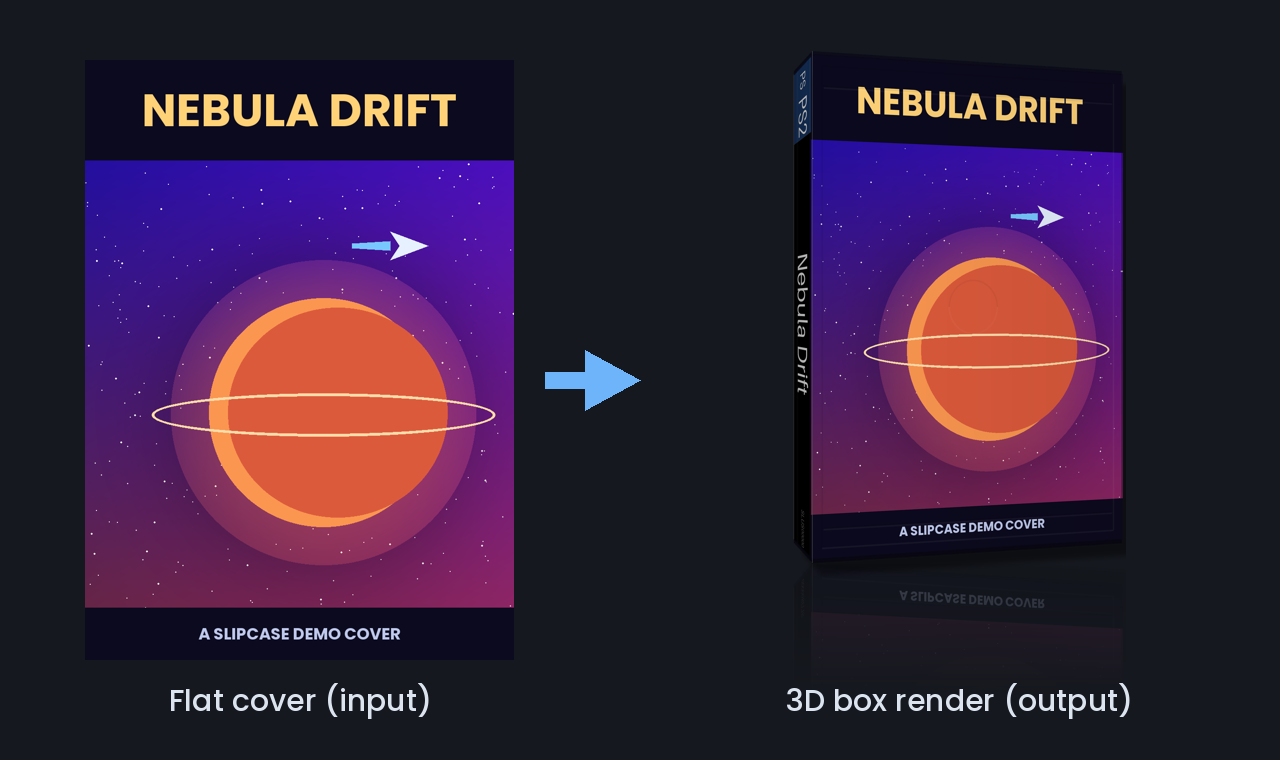
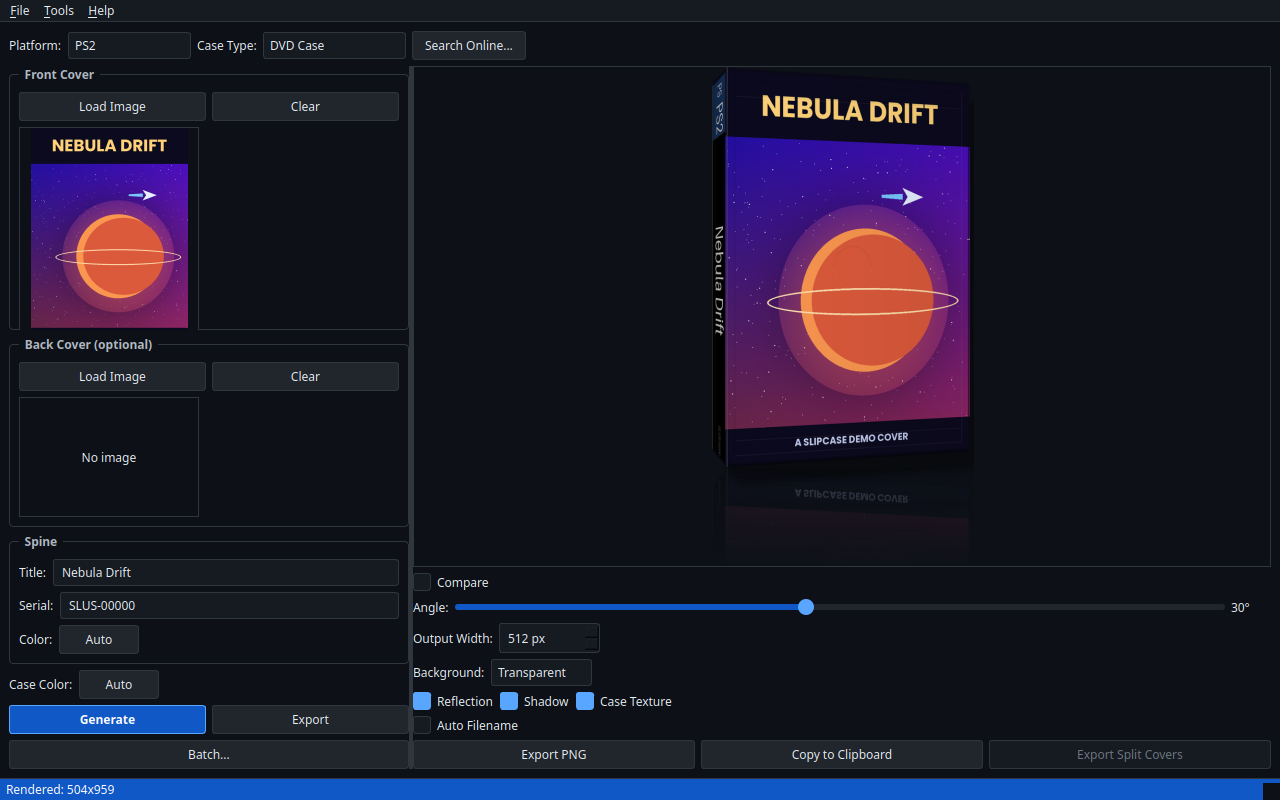
A 40-second trailer for Slipcase, with background music and soft clicks but no speech; everything it says is written on screen. It is styled like an arcade game: pixel lettering over a dark sky, a striped setting sun and a glowing grid floor. It opens with "Your game collection. A wall of flat covers." A before-and-after picture follows: a flat cover for a made-up game called Nebula Drift, an orange planet on a purple sky, and beside it the same cover as a 3D box, under the line "Slipcase turns every cover into a real 3D box". Then the Slipcase logo and "Realistic 3D box art from flat 2D covers". Four clips of the app follow, each with a caption below. "Load a cover. Click Generate.": the cover is loaded and a 3D DVD case of Nebula Drift appears in the preview. "Fifteen case types, true to the millimetre": the platform is changed to Switch and the box is redrawn as a slimmer Switch case. "Turn it to any angle": the angle slider is dragged and the box turns further side-on, showing more of its spine. "Save it as an animation": the saved animation plays on its own, the box swinging from almost face-on to a sharp angle and back. Three lines follow: "Finds the artwork for you", "Builds a spine when there isn't one" and "Does a whole folder at once". Then "Linux · Windows · Mac" and "One download for your system". It ends on the logo with "Free and fully open source", "Download it free at antsprojectshub.co.za", and links to support the project on GitHub Sponsors, Patreon and Paybru.
Screenshots
About Slipcase
A game collection browsed on screen is a wall of flat rectangles. The same collection on a shelf is a row of boxes you can see the thickness of — and it looks enormously better.
Slipcase turns the first into the second. Give it a flat 2D cover image and it renders a photorealistic 3D box: front face, spine, top edge, correct proportions, proper lighting and a soft shadow underneath.
What it does
- Knows what the box should look like. Each console gets its own case size and plastic, per region, modelled in millimetres — a US SNES box is 32 mm deep, a PS3 Blu-ray case 13 mm, a Game Boy box is small and surprisingly chunky. Slipcase picks the region's case from the cover's file name, such as "(Europe)", and you can pick another. PlayStation and Dreamcast games look like their real jewel cases. The list runs from NES cartridge boxes and Genesis clamshells through N64, DVD, Blu-ray and jewel cases to Game Boy Advance, DS, 3DS, PSP, Vita and Switch, plus a generic cartridge case.
- Builds a spine when your cover does not have one, which most scraped cover art does not.
- Understands full scans. If your image is a whole wrap-around scan — back, spine and front in one picture — it finds the spine and uses it. It can also split such a scan into three separate images. Give it a back cover, or a full scan, and it can render the back of the box as well.
- Finds the artwork for you. It searches ScreenScraper, TheGamesDB and the libretro thumbnail server directly, so you are not hunting for images by hand.
- Renders it cleanly. Everything is drawn at double size and scaled back down, which is what stops the edges of the box looking like a staircase. A soft reflection under the box is on by default, and can be turned off.
- Lets you turn the box in 3D. The 3D View shows all six sides. Turn it with the mouse or arrow keys, zoom with the wheel, or let Auto-spin turn it. Exports also save a box file beside each picture, ready for RetroDB's importer.
- Animates the box. It can turn the box from almost face-on to a sharp angle and back, and save that as an animated PNG, which keeps the transparent background, or as a GIF.
- Outputs what your frontend actually wants — PNG with a transparent background, sized for RetroArch's thumbnail system or LaunchBox's larger 3D box art. The box is turned at 30 degrees by default, LaunchBox-style, and you can change the angle.
It processes a whole folder at a time, not one cover at a time.
Where it stands
Live, with downloads for Linux, Windows and Mac. The buttons at the top give you one file for your system, with everything it needs inside.
- Linux: an AppImage. Download it, make it executable, and run it; there is nothing to install. It needs a 64-bit Intel or AMD computer and a Linux system from about 2022 or newer — it is built on Ubuntu 22.04.
- Windows: a single portable program for 64-bit Windows. Double-click it; nothing is installed. It is not signed, so the first time you run it Windows shows a blue "Windows protected your PC" screen. Click More info, then Run anyway.
- Mac: a disk image; drag the app onto Applications. The button gives the build for Apple silicon (M1 and later). For an older Intel Mac, use the Intel build instead. It is not signed, so macOS blocks the first launch: try to open it once, then go to System Settings, Privacy & Security, scroll down and click Open Anyway.
One honest caveat about the Mac build: nobody has tried it by hand on a real Mac yet. It is built on GitHub's Mac machines, where it passes its own self-check and the full test suite. If it misbehaves for you, please report it.
Updates. Slipcase can tell you when a new version is out; turn this on in Settings. On Linux and Windows it can then install the update for you, after checking the download's signature. On a Mac it opens the download page. The install step has not yet been run end to end, because that needs a later release to update to.
Safer downloads, steadier search. Cover-art searches and image downloads have firm limits on size and time, so a slow or misbehaving server can no longer hold a download open. Clicking quickly through search results no longer freezes the window, and a preview from an earlier search no longer shows up beside a newer result.
It is built with Python and Qt, and downloads images only from a fixed list of known art sources over HTTPS, with a size cap, because "fetch this URL and decode it as an image" is not a thing to leave open-ended.
What's new · v1.4.0 30 October 2026
Theme: In-app updates, signed downloads and real cases for each console.
Added
Slipcase can tell you when a new version is out (SLIP-0031) Turn it on in Settings, on the Updates tab; it is off until you do. On Linux and Windows, Update now downloads the new version, checks its signature, installs it and reopens Slipcase. On a Mac it opens the download page. Skip this version stops that version being offered again.
Every download on the releases page now has a signature beside it (SLIP-0030) A
.sigfile, made with Slipcase's release key. The in-app updater refuses any file whose signature does not match.A European PlayStation case shows "PlayStation" moulded into its top and bottom in the 3D view (SLIP-0110) Turn the box to look at its top or bottom edge and the raised logo is there, as on the real case. It follows the Case Texture setting. Box files gain top and bottom pictures for cases that have them.
PlayStation and Dreamcast games now look like their real jewel cases (SLIP-0106, SLIP-0114, SLIP-0115) The front booklet sits beside a strip of bare tray plastic under a clear lid with a soft shine. A loaded back insert's two printed edges go on the case's two sides. Each case has its tray's real colour, and a European PlayStation case is thicker. Slipcase picks the US, European or Japanese case from the cover's file name, such as "(Europe)", and you can pick another in the case list. Box files gain the opening side's picture. The strip beside the booklet on a US Dreamcast case, and on a US or Japanese PlayStation case, is a clear window. It looks through to the print inside the back of the case, "Sega Dreamcast" or a ribbed band, and that print shifts as you change the view angle. A European Dreamcast case shows "Dreamcast" moulded into its blue strip (SLIP-0112).
SNES and N64 boxes lie landscape, as the US and European boxes do (part of SLIP-0108) A Japanese cover gets the tall Super Famicom or Japanese N64 box.
Turn the box in 3D, and save it for RetroDB (SLIP-0104) A new 3D View shows all six sides of the box. Press the 3D View button under the preview, or Ctrl+3, to open it. Turn it with the mouse or the arrow keys, zoom with the wheel, or let Auto-spin turn it. Exports and batch renders now also save a box file beside each PNG, ready for RetroDB's importer. A setting under Settings, Export turns the box file off.
The About box and the README now say who owns the cover art Covers belong to their publishers, and Slipcase is not affiliated with any console maker, publisher or cover-art service.
Changed
Online cover search is faster ScreenScraper, TheGamesDB and libretro are now asked at the same time. A search takes as long as the slowest service, not all three added together. A service that cannot start no longer stops the others.
Each console now has its own DVD, Blu-ray or handheld case, in its real size and plastic (part of SLIP-0107) "DVD Case" and "Blu-ray Case" become one case per console, such as "PS2 DVD Case" and "PS4 Blu-ray Case". A European PS2 or DS game, or a Japanese GameCube game, gets its region's case from the file name. Coloured cases show their real plastic on the top, bottom and opening edge: a European PS2 case is blue, a Wii case white. Clear cases such as Switch and PSP show the cover through their edges, with a soft shine. Several handheld sizes are corrected. Case Color still overrides the plastic.
The CD Jewel Case now stands landscape, as the real case does (SLIP-0106) It is 142 mm wide and 125 mm tall, and draws as a jewel case. PlayStation games now default to the new PS1 jewel cases, and Dreamcast games to the Dreamcast ones.
Fixed
A cover search typed in lower case now finds the cover without an account (SLIP-0116) With no cover-art service set up, libretro needs the exact title. A title typed all in lower case is now also tried with capitals, and "No results found" says to try the full title.
A ScreenScraper search with no match no longer lists a nameless game An empty or partial reply from ScreenScraper or TheGamesDB now gives no results, instead of failing the whole search.
A jewel case's back no longer shows the lid's double line (SLIP-0106) The two lines beside the hinge mark where the front lid opens, so they now appear on the front only.
A European PlayStation back insert no longer leaves its printed edges on the back (SLIP-0111) A European insert is wider than a US one. With the US case shown, its two printed edges stayed on the back, and the boundary sliders could not reach far enough to fix it. Loading a back insert now picks the case it fits, unless you chose the case yourself, and the sliders reach across a whole edge.
A ScreenScraper search no longer fails with "Read timed out" (SLIP-0103) A search with no system chosen can take most of a minute to start answering, and Slipcase gave up after 30 seconds. A search now waits up to 90 seconds. Choosing a system still makes the search much faster.
The box in an exported animation keeps one size as it turns (SLIP-0105) Each frame was fitted to the chosen width on its own, so a DVD box looked over a third taller at a sharp angle than face-on. Every frame now uses the scale of the widest frame.